Daily planning for people with too many projects

Your day, across every project.

Flowly gathers the tasks from all your projects and teams into one board for today, grouped into swimlanes by project, context or anything you tag. On your desk, on your phone, in your team chat. Tomorrow starts clean.

Flowly's My day board: tasks from two workspaces in swimlanes by project, with To do, In progress, Review and Done columns and a backlog on the side.

Plan the day the way you actually work

Not another list per project. One view of what matters today, from everywhere.

Swimlanes by anything

Group today's tasks by project, workspace, person, priority or your own tags, like @calls or @deep work. Drag a card to another lane and it moves there for real.

All your workspaces, one day

Work, side projects and home in separate workspaces, each with its own colour, people and rules. My day brings everything assigned to you together.

Write it down, snap it, done

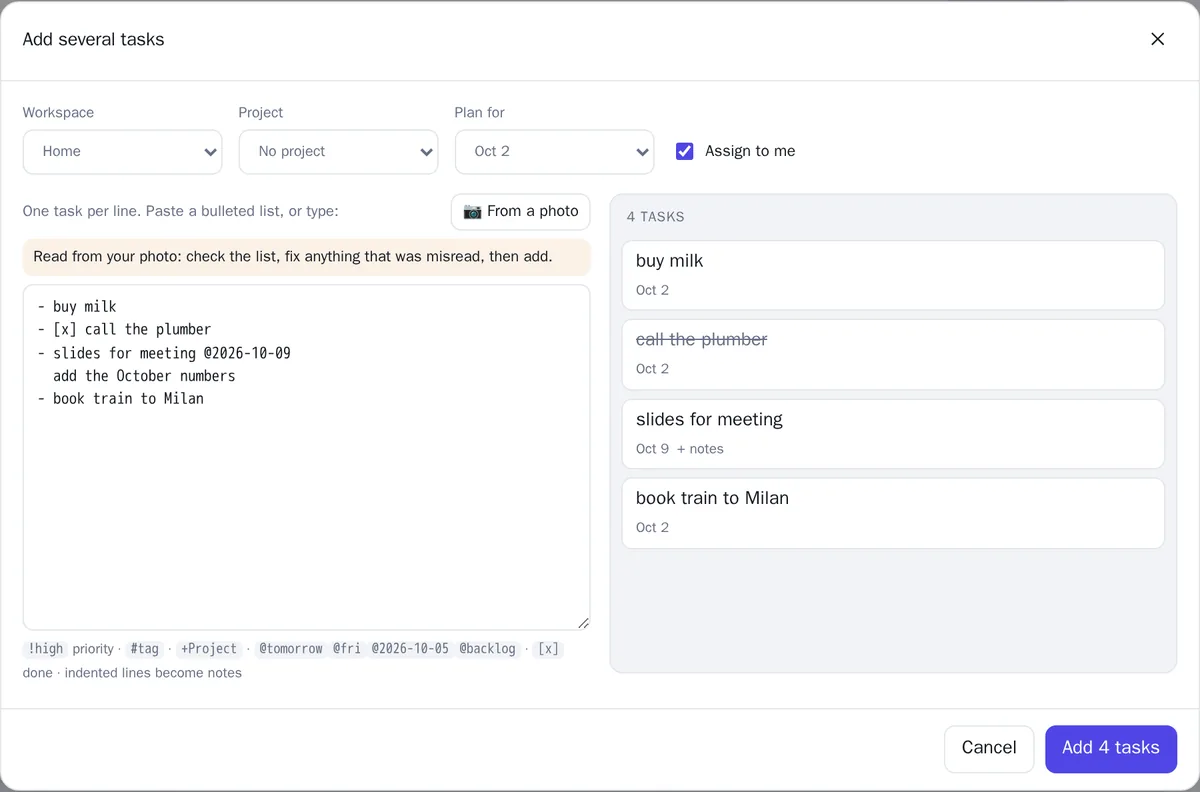
Photograph a handwritten list, paste your meeting notes, or send Flo a voice message: AI turns it into tasks, with who does what and by when. Or paste a list with !high, +Project, @tomorrow, ~30m, =Anna.

Your calendar, as background

Google, Outlook / Microsoft 365, CalDAV (Nextcloud, iCloud…) or any iCal link: events sit above the board without becoming tasks, and the few that need preparation are flagged. Your tasks go back into your calendar app as a private feed.

Your statuses, your priorities

Columns and priorities are tags you define: add Review or Waiting, reorder them, choose what counts as done. Unfinished work carries over.

Discuss, attach, share

Every task has a thread and its documents (uploads, links, Google Drive, OneDrive / SharePoint) and its own link: private, team, shared with people, or public read-only.

Repeat, check off, remind

Recurring tasks (every weekday, every 2 weeks, monthly…), checklists inside a task, reminders at a time on your phone, desktop or Telegram, and estimates that show when a day is overbooked.

Templates and search

Save a set of tasks once (“client onboarding”, “monthly close”) and create them all with dates from a start day. Find anything (tasks, comments, wiki pages) with Ctrl+K.

Bring your history

Import Trello boards and Asana projects with their lists, labels, checklists, due dates and comments, or sync chores both ways with your self-hosted Donetick.
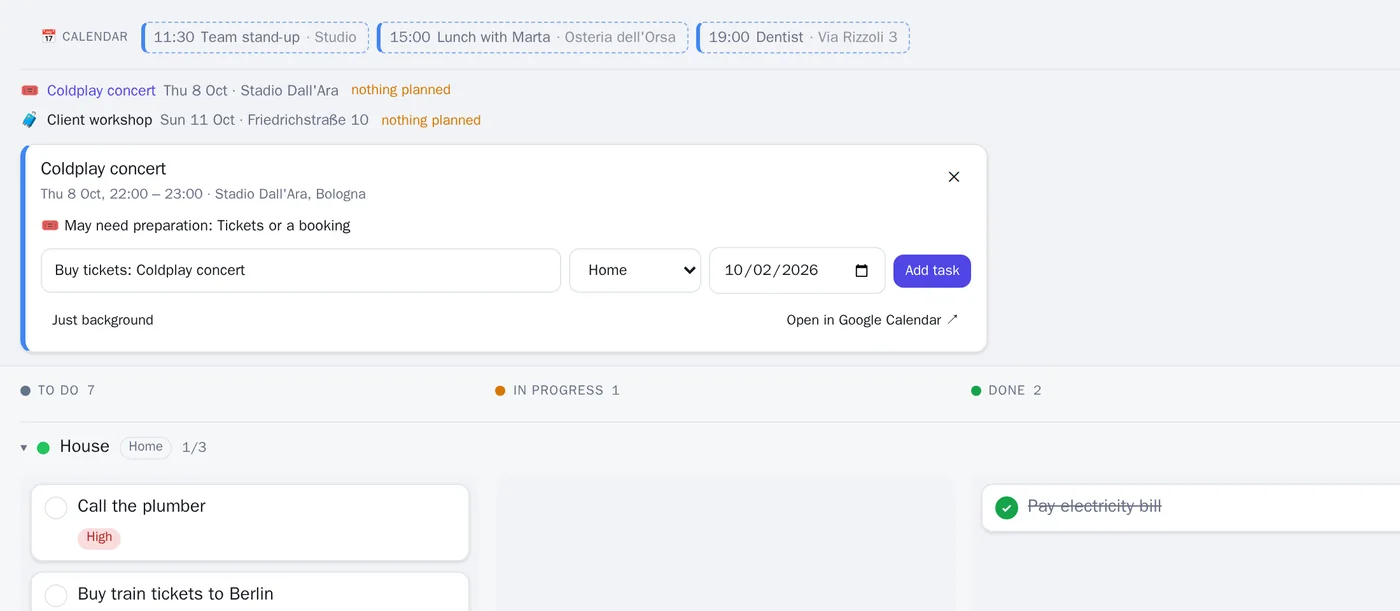
My day with today's calendar events above the board; a concert next week is flagged as needing tickets, with a one-click 'Buy tickets' task.
Bulk add after reading a photo of a handwritten list: buy milk, call the plumber (done), slides for Friday's meeting with a note, book train to Milan.

Plan your time, not just your tasks

A list says what. Flowly also helps with when, how much, and how it went.
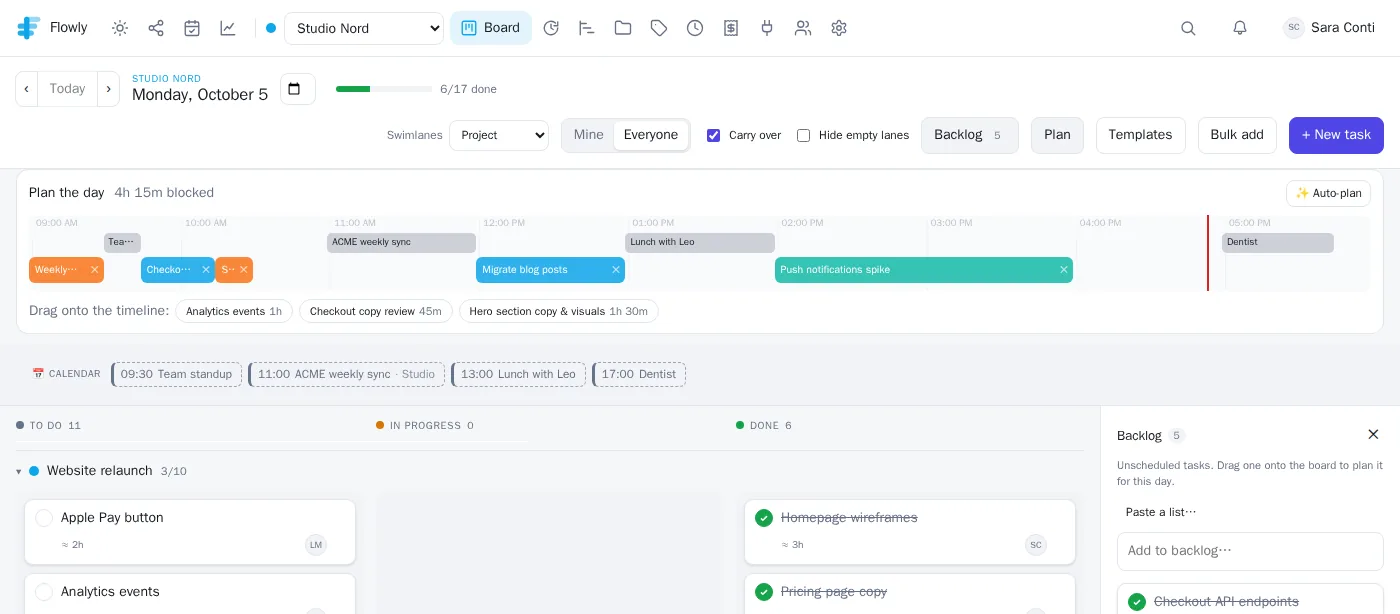
Plan the day: a timeline from 9 to 18 with the day's meetings in grey and colored time blocks for tasks fitted around them, and the tasks still to place.

Time blocking

Drag tasks onto the day, or let Auto-plan fit them around your meetings using their estimates. Blocks remind you when they start and show up in your calendar app.

Weekly review

Every Friday: what got done, where the time went, what keeps slipping, how your estimates hold up, and Flo's three priorities for next week. Fix what's left in one click.

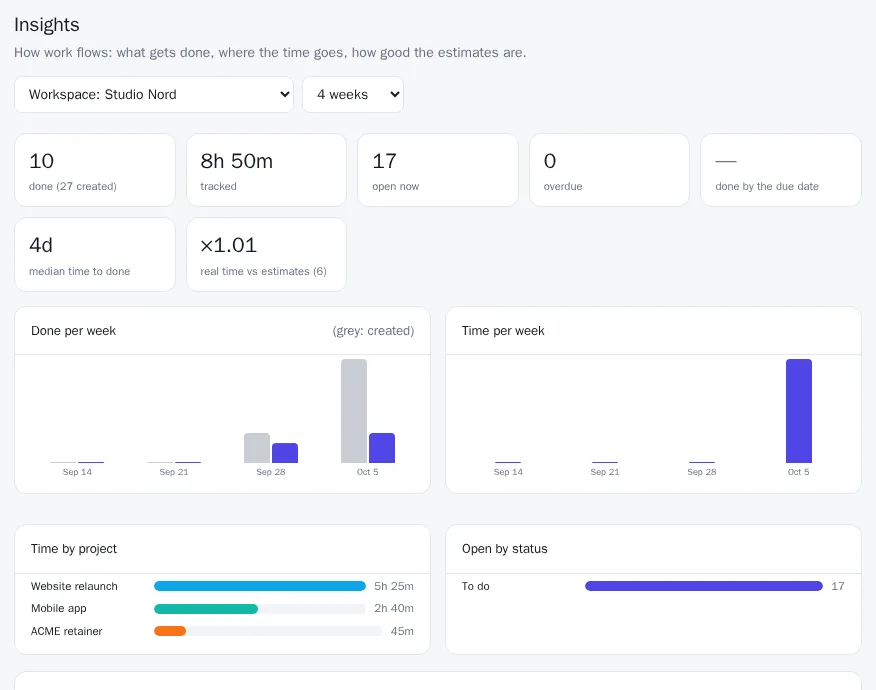
Insights

For you, a project or a whole workspace: throughput per week, time by project, on-time rate, time to done, estimates vs. real time, and who has what open.
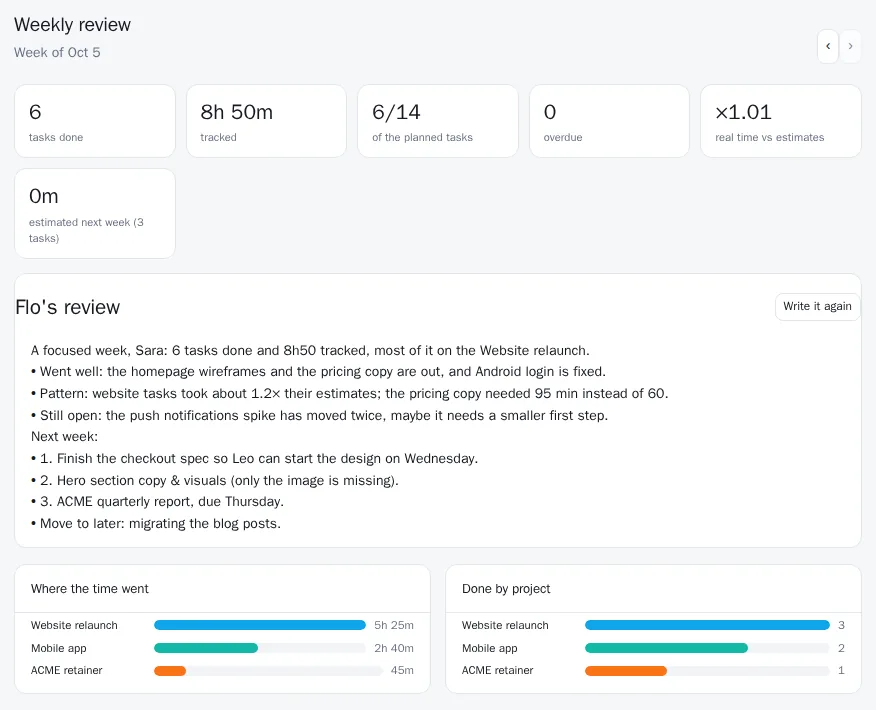
The weekly review: tasks done, time tracked, planned tasks done, Flo's written review with next week's priorities, and where the time went by project.
Insights for a workspace: tasks done and created, time tracked, open and overdue tasks, on-time rate and time to done, with charts per week and per project.

Timeline & dependencies

Tasks as bars from planned day to due date, with arrows for what waits for what; drag a bar to reschedule. Blocked tasks stay out of your way until they're unblocked, and you're told when they are.
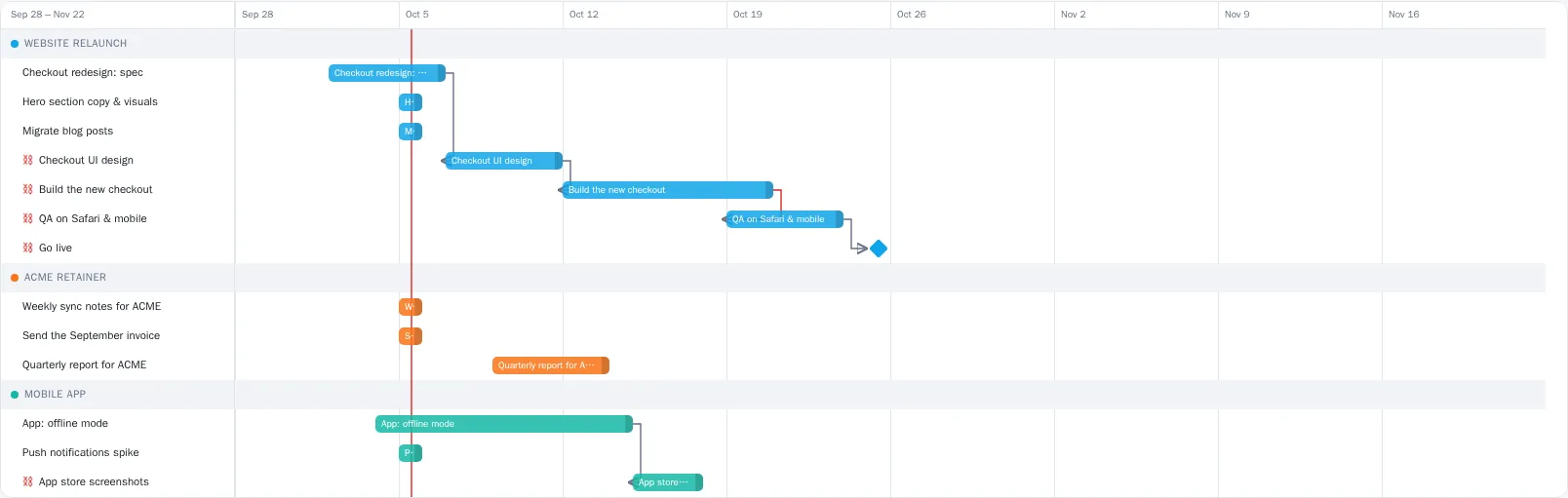
The timeline: tasks as bars from planned day to due date, grouped by project, with arrows between tasks that wait for each other and a milestone for the launch.

Made for focus, with an ADHD mode

Opt in, and Flowly shows one thing at a time.
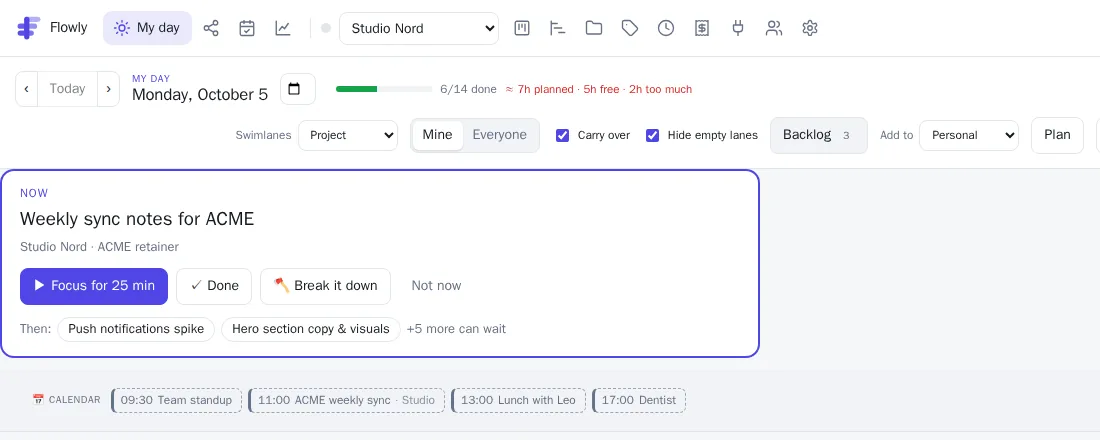
  • A “Now” card with the single next task: focus for 25 minutes, done, not now, or let Flo break it into tiny steps.
  • Today's 3 on your phone; the rest waits, folded away.
  • Gentle nudges: a check-in while the timer runs, a break after long stretches, a heads-up before meetings.
  • Flo adapts: shorter, concrete, no guilt about yesterday, and a small celebration when something gets done.
ADHD mode: a Now card with the next task, buttons to focus for 25 minutes, mark done, break it down or postpone, and the next two tasks.

Your day in your pocket

On the phone, Flowly keeps only what you need on the go.

  • Today, at a glance. Your tasks from every workspace, with what's carried over and what's urgent.
  • One tap to track. A big ▶ on every task starts the timer; the bar at the top stops it.
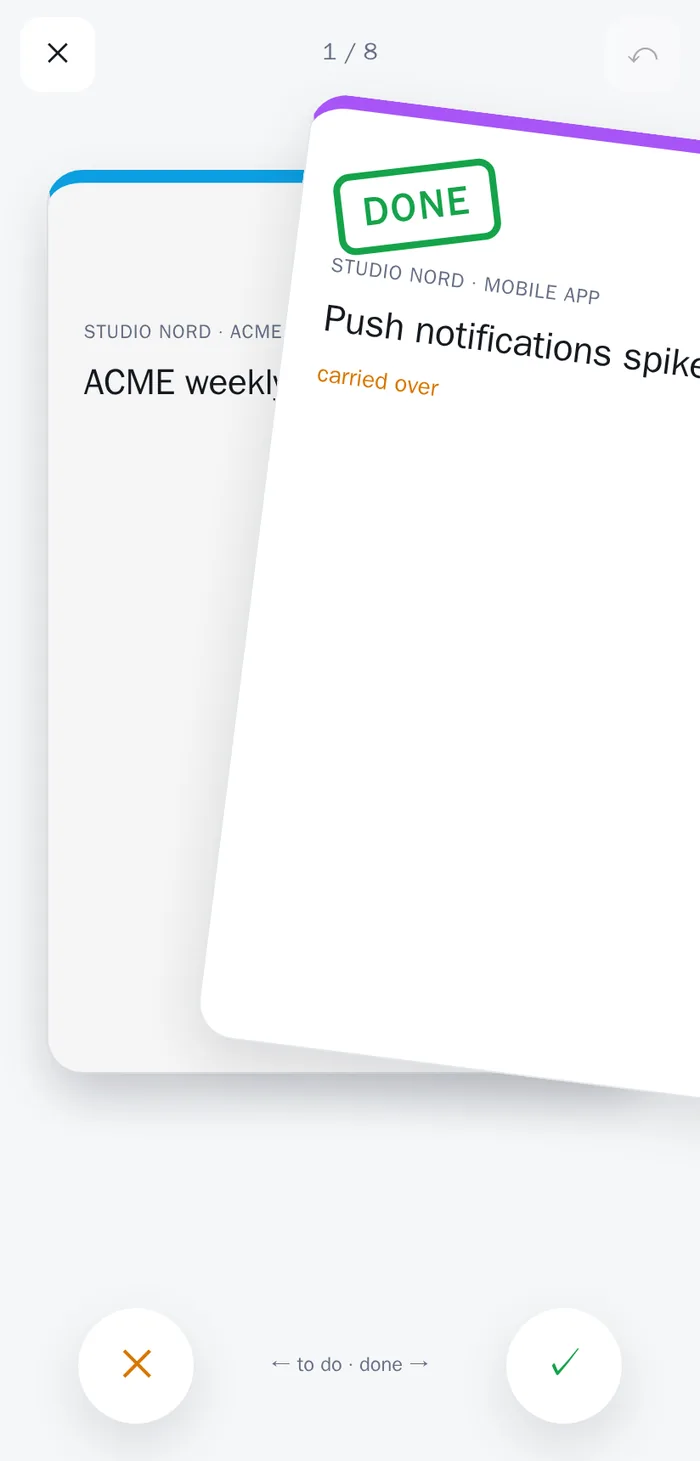
  • Swipe to review. Right is done, left stays to do. Clear the day in thirty seconds, with undo.
  • Photo of a list. Snap the to-do list on your desk and add it in one go.

Android app and desktop tray timer available now; on iPhone, add Flowly to your home screen while the App Store version is on its way.
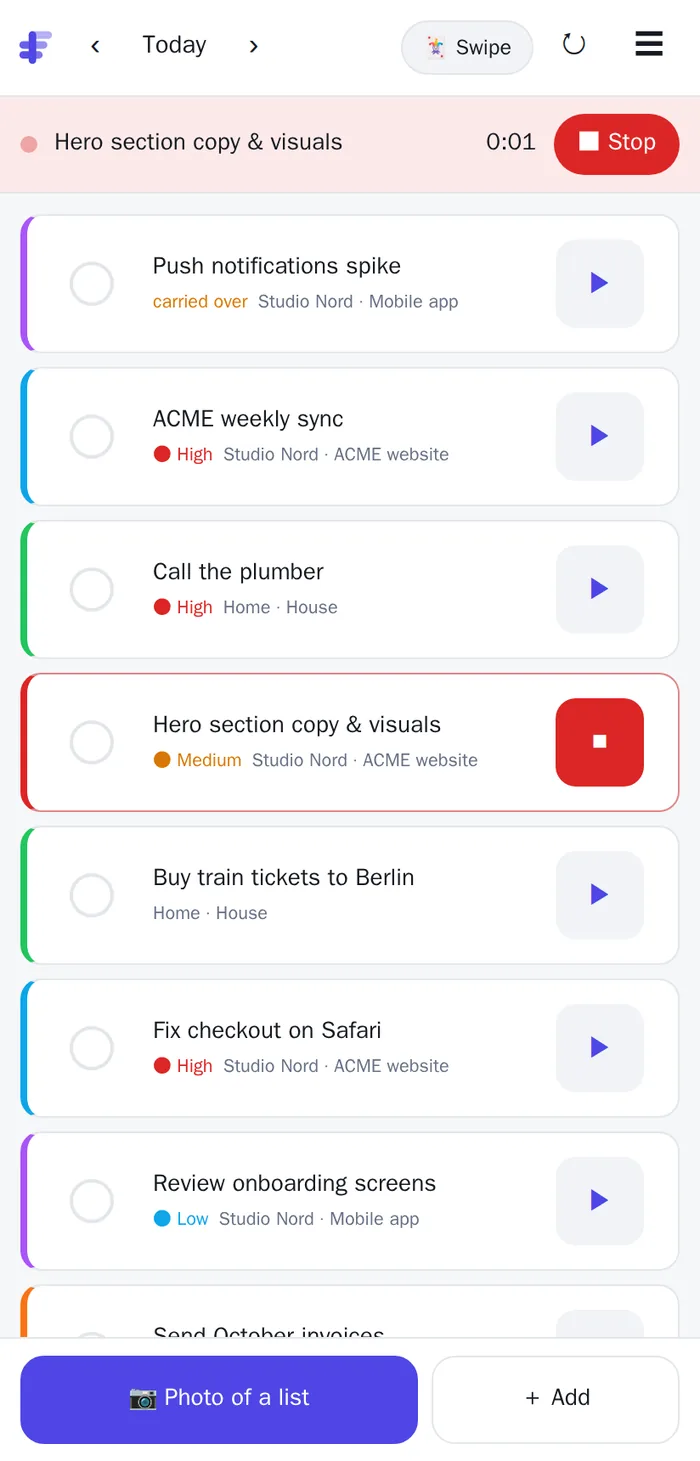
Flowly's compact phone view: today's tasks with a play button each, a running timer bar, and buttons for a photo of a list and adding tasks.
Swipe review on a phone: a task card dragged to the right with a green DONE stamp.

AI that knows your day

Bring your assistant to your tasks, or let Flowly's come to you.
  • The concierge (Pro) on Telegram and in the app: a morning brief that also checks your calendar (“the concert is Thursday: tickets?”), urgent alerts, and tasks added, moved or timed by chat.
  • Send it a photo or a voice message: a written list, a dictated to-do, or “move the proposal to Friday”. It also plans your day into time blocks and writes your weekly review.
  • Meeting notes and emails become action items, assigned to the right people with their dates.
  • Your team's wiki (a GitHub wiki, a docs folder or a MediaWiki) is knowledge Flo and the agent use for answers and delegated work.
  • Delegate to Flo (Pro Plus): hand over research, drafts and plans. Flo checks what it can do, works on it and reports on the task, sources included. It never sends, books or buys anything.
  • ChatGPT, Claude and any MCP client. Connect Flowly as a connector and ask “what's left today?”, add tasks, log time or search past work, with your permissions.
  • Workspace-level MCP for organization flows and automations, with service tokens that act as a bot member.
Good morning, Sara! Studio Nord first: the ACME weekly sync (high), then the hero copy. The Coldplay concert is next Thursday and nothing covers it yet: shall I add “buy tickets”?
Yes, for today. And start the timer on the hero copy.
Done: “Buy tickets: Coldplay concert” is on today, linked to the event, and the timer is running on “Hero section copy & visuals”.
Marta/today
☀ Studio Nord · Fri 2 Oct
Marta (3): 🔴 Fix checkout on Safari · ACME website …
Luca (2): Review onboarding screens · Mobile app …
✅ 4 done so far today
Luca📷 photo of the whiteboard · /tasks
📋 Added 5 tasks to Studio Nord. /undo removes them.

Built for teams, comfortable alone

  • Telegram groups and Slack (Enterprise). The team's plan every morning, live updates, questions answered in the chat, whiteboard photos turned into tasks.
  • Safe in a group. Private tasks never appear; people who aren't in the workspace can only read; everyone else acts as themselves.
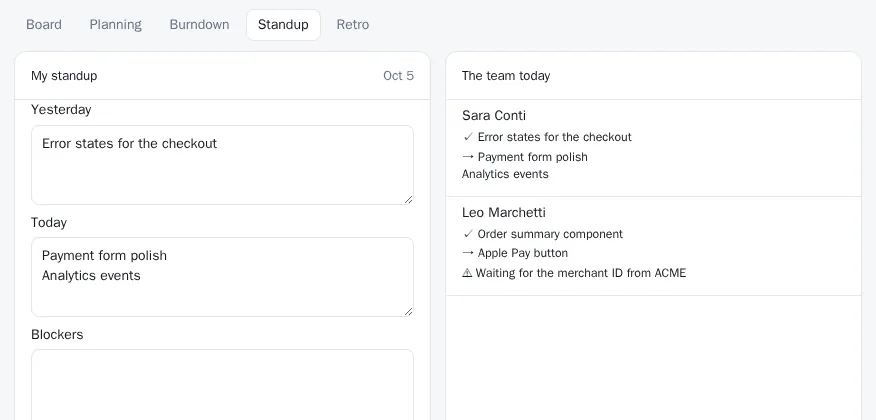
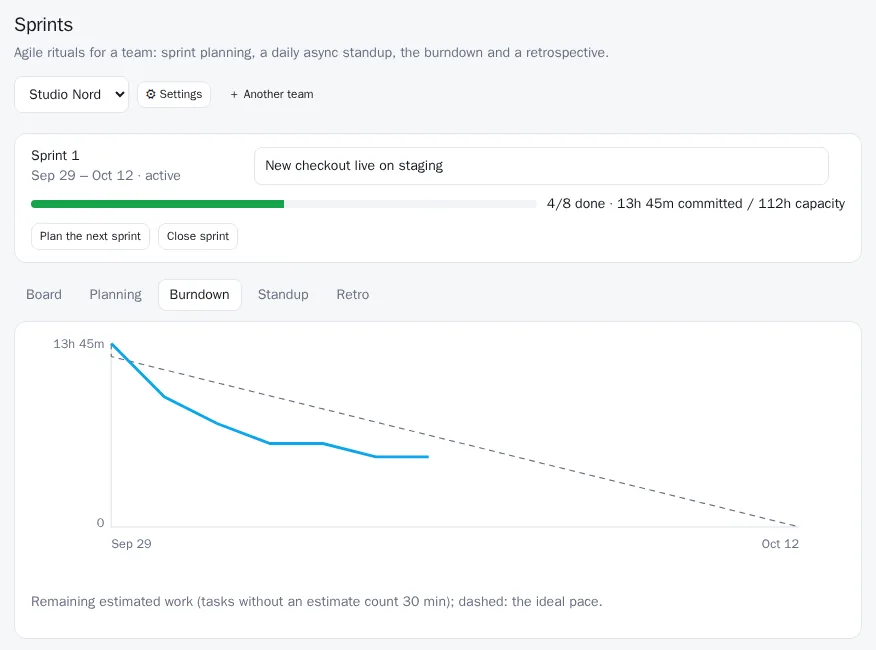
  • Agile rituals, if you want them. Sprints with planning, capacity and a burndown, an async daily standup (drafted from each person's tasks, answered by just replying to Flo) and a retrospective board whose items become next sprint's actions. Opt in per workspace or per project.
  • Dependencies and a timeline for plans that span weeks.
  • Roles & invitations. Owners, admins and members. Invite by email or share a join link.
  • Notifications for assignments, urgent tasks and comments: in the app, on your desktop and on Telegram.
  • Your colours. Each workspace tints Flowly while you're in it. Light, dark or follow the system, in six languages.
A sprint: the goal, progress against the team's capacity, and the burndown of remaining estimated work against the ideal pace.
The async standup: my update drafted from my tasks, and the team's updates today with a blocker flagged.

Works where your work already is

Connect a whole workspace or just one project.

  • GitHub Issues become tasks; closing either side closes the other; comments sync both ways.
  • Calendars Google, Outlook / Microsoft 365, CalDAV and iCal links, several accounts; your tasks back as an iCal feed.
  • Email in Forward to [email protected]-style aliases: a task, or AI turns a long email into its action items.
  • Slack Updates in a channel, or the full Slack app with @Flowly and /flowly.
  • Telegram Your personal concierge, and the team bot in your group.
  • Webhooks Signed outgoing events and an incoming URL that creates or updates tasks.
  • Google Drive & OneDrive Attach documents straight from your drives.
  • Wikis A GitHub wiki, a docs folder or a MediaWiki as team knowledge for Flo.
  • Donetick Two-way sync with your self-hosted chores app, by workspace, project or label.
  • Trello & Asana Import boards and projects with lists, checklists and comments.
  • Your own AI (Enterprise) An OpenRouter key or an on-premises OpenAI-compatible model, with data kept exclusive to it.
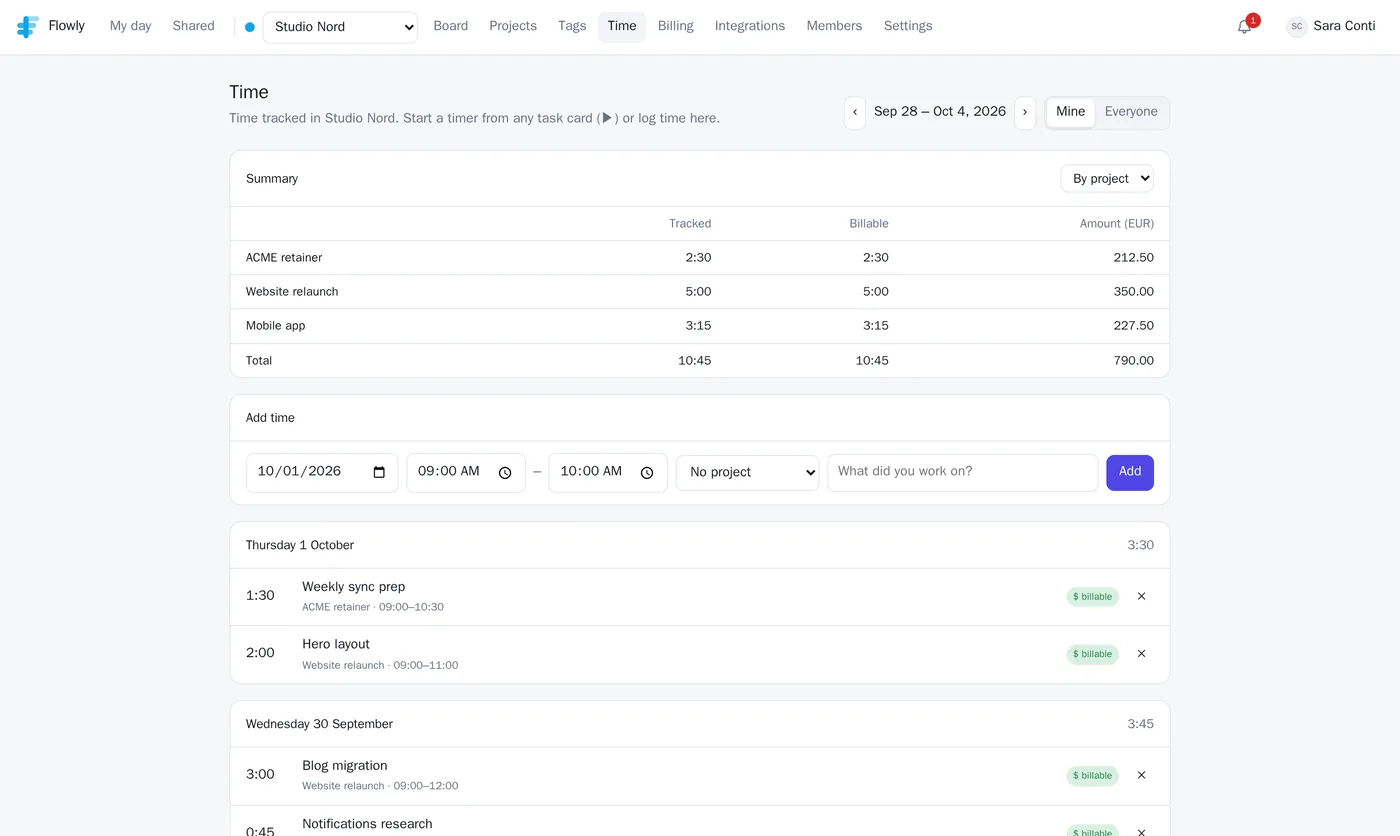
The Time page: tracked and billable hours per project for the week, with amounts in euros.

Track time, invoice it, get paid

  • A ▶ on every card, in the phone app and in your desktop tray. Or log it afterwards: 1:30, 45m, 2h.
  • Billing is off until you switch it on per workspace. Each project uses your rate, its own rate, or opts out.
  • Invoices from unbilled time, with rounding and tax. Print to PDF, export CSV, or download the e-invoice: FatturaPA for Italy, XRechnung for Germany, Factur-X for France, checked against the official validators.
  • Pay online: connect your Stripe account and every invoice gets a card-payment link; it's marked paid when your client pays.

Pricing

Start free. Upgrade when the AI and the invoices start paying for themselves.

Free

€0

  • Unlimited workspaces, projects and tasks
  • My day, swimlanes, phone and desktop apps
  • Recurring tasks, checklists, reminders, templates, search
  • Time blocking, timeline, insights, weekly numbers
  • Sprints, standups and retros for teams
  • Time tracking and reports
  • GitHub, calendars, email in, wikis, Donetick, imports, webhooks
  • Claude, ChatGPT and MCP connectors
Start for free

Pro Plus

€10/month

or €100/year, plus VAT where it applies

  • Everything in Pro
  • Delegate tasks to Flo: 60 a month
  • Research with sources, drafts, plans and subtasks
  • Results on the task, a ping on Telegram
  • Flo suggests what it can take on each morning
Try Flowly, upgrade in Settings

Enterprise

Custom

per workspace, invoiced yearly or monthly

  • Everything in Pro
  • Flowly in your Telegram groups
  • The Flowly Slack app
  • Your own AI: OpenRouter key or on-premises model
  • Invoice billing and onboarding with us
Start free, then ask us

Get the apps

The web app works everywhere. These add a timer in your tray and your day on your phone.

All downloads (including .deb, .rpm and checksums) and first-run tips: app.flowly.net/apps · latest release

Plan tomorrow in two minutes.

Create an account, add your projects, and drag today into shape.

Start for free